Audio/Video Transcriber
A Windows desktop app, still experimental, that transcribes audio and video locally with OpenAI Whisper: recordings never leave the computer.
Fact sheet
- Role
- Design, development and distribution, on my own
- Year
- 2025
- Status
- Private
- Sector
- Productivity
- Devices
- Windows desktop
- Main stack
- Python · Whisper · CustomTkinter · MoviePy · FFmpeg · PyInstaller · Inno Setup · Windows
Overview
The project at a glance
A Windows desktop app, still experimental, that transcribes audio and video locally with OpenAI Whisper: recordings never leave the computer.
Audio/Video Transcriber is a Windows desktop application that turns recordings and videos into text using OpenAI Whisper right on the computer. I built it for personal use, for notes and lectures, and I am still trying it out: it is an experimental tool. Its core idea is privacy, because no file is uploaded to anyone else's service.
Features
What it does
One function, with the options needed to use it for real.
Audio and video
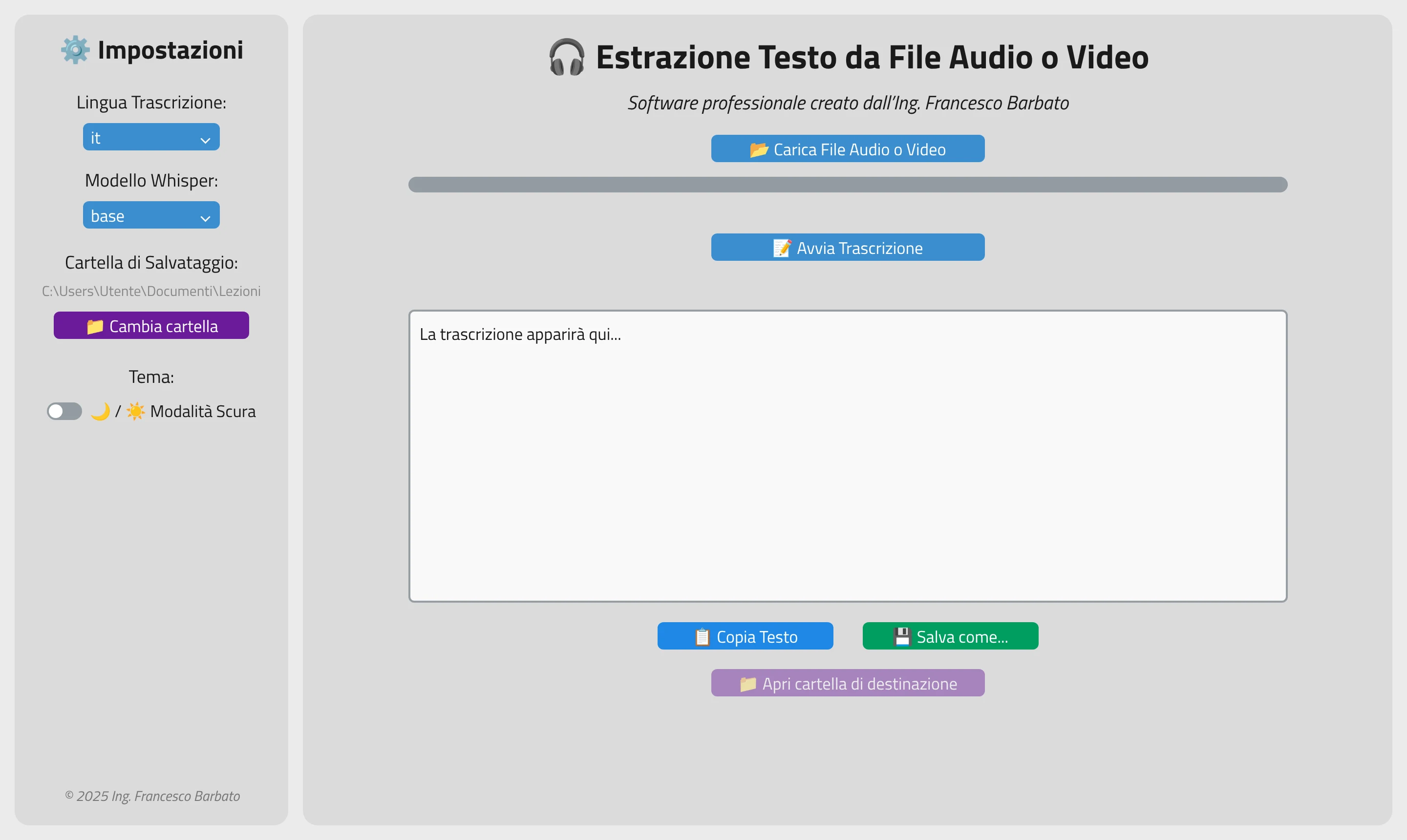
Accepts MP4, MKV, AVI, MOV, MP3, WAV, M4A and FLAC: for videos it extracts the audio by itself.
Language and model
You choose the spoken language and the size of the Whisper model, from tiny to medium.
Readable text right away
The transcript appears in the window and is saved to a text file, in the folder you choose.
Copy and save
Copy to the clipboard in one click, or save the text under another name.
A window that does not freeze
Processing starts in a separate thread, so the interface stays usable.
Light or dark theme
A switch changes the look of the interface.
Windows installer
A setup program with an icon, a welcome screen and texts in Italian.
The challenge
The problem to solve
Online transcription services require uploading recordings to third-party servers. I needed a tool that did the same job entirely locally, with an interface simple enough to use without touching a terminal, and installable like any other program.
From recording to text, without the file leaving the computer.
History
From prototype to installer
A small, recent project, still being tested.
October 2025
The first version
Interface, audio extraction and Whisper transcription in a single program.
October 2025
Installer and public code
The program is packaged with a Windows installer and the code is published on GitHub with its licence.
Next
Ideas for the future
Live transcription from the microphone, a multi-language interface, lighter models and macOS and Linux versions.
Approach
From problem to release
Analysis
One job, done well: from an audio or video file to a text file. What matters are the language and the model size, because they set the trade-off between accuracy and waiting time.
Design
A window with a sidebar for settings (language, model, save folder, light or dark theme) and a central area for loading the file, starting the transcription and reading the text. A start screen with the logo gives the program an identity.
Development
Python with CustomTkinter for the interface, MoviePy and FFmpeg to extract the audio and Whisper for speech recognition. The transcription runs in a separate thread, so the window does not freeze.
Release
The program is bundled into an executable with PyInstaller and distributed with an Inno Setup installer in Italian that needs no administrator rights. The code is on GitHub.
Architecture
How it is built
A single-process desktop application. The interface collects the file and the settings, the engine extracts the audio with MoviePy and passes it to Whisper, which transcribes it on the computer. The text is shown in the window and written to a text file in the chosen folder, while the temporary audio file is deleted at the end. Nothing goes over the network.
Illustrative diagram
Parts of the diagram
Hover over a part, or select it, to read what it does.
Quality
What is there and what is missing
It is an experimental tool: here is what it already protects and where it falls short.
Privacy
- Whisper runs on the computer: no file is sent to external services.
- The extracted audio is a temporary file, deleted once the transcription ends.
- The text is written only to the folder chosen by the user.
Known limits
- The progress bar is indicative and does not follow the real state of the model.
- The output is plain text, without timestamps or subtitles.
- With the larger models on the processor alone, the wait is long.
- One file at a time.
Distribution
- A single executable built with PyInstaller.
- An Inno Setup installer that needs no administrator rights.
- The package is heavy, about 220 MB, because it includes the model and FFmpeg.
I tried it on real recordings with the medium model; I have not formally measured either speed or accuracy.
Results
What changed
Local
Privacy
Audio and text stay on the computer: no cloud API, no uploads.
4 models
Accuracy or speed
From tiny to medium: medium is more accurate but slower, and I tried it on real recordings.
5 languages
Languages
Italian, English, Spanish, French and German, chosen before transcribing.
Data available on request
Contribution
From idea to installer
A personal project: I did everything myself.
Idea and requirements
Transcribe locally, so as not to upload recordings to other people's services.
Interface
The window, the settings sidebar, the start screen and the light or dark theme.
Transcription engine
Audio extraction, Whisper integration and processing in a separate thread.
Packaging
The executable with PyInstaller and the installer with Inno Setup, with a custom icon and texts.
Testing
Checks on real recordings and several file formats.
Stack
Technologies
- Frontend
- CustomTkinter
- Backend
- Python
- MoviePy
- FFmpeg
- AI
- Whisper
- Infrastructure
- PyInstaller
- Inno Setup
- Windows
Gallery
Screens
Why the details are limited
This project is not publicly accessible, so this page gives an outline of it. On request, I can present it in detail.
Request a dedicated presentationMore projects
Keep exploring
Interested in a similar project?
Write to me: I can present the work in detail, within the limits of the confidentiality agreements.