Il Diritto Vivente
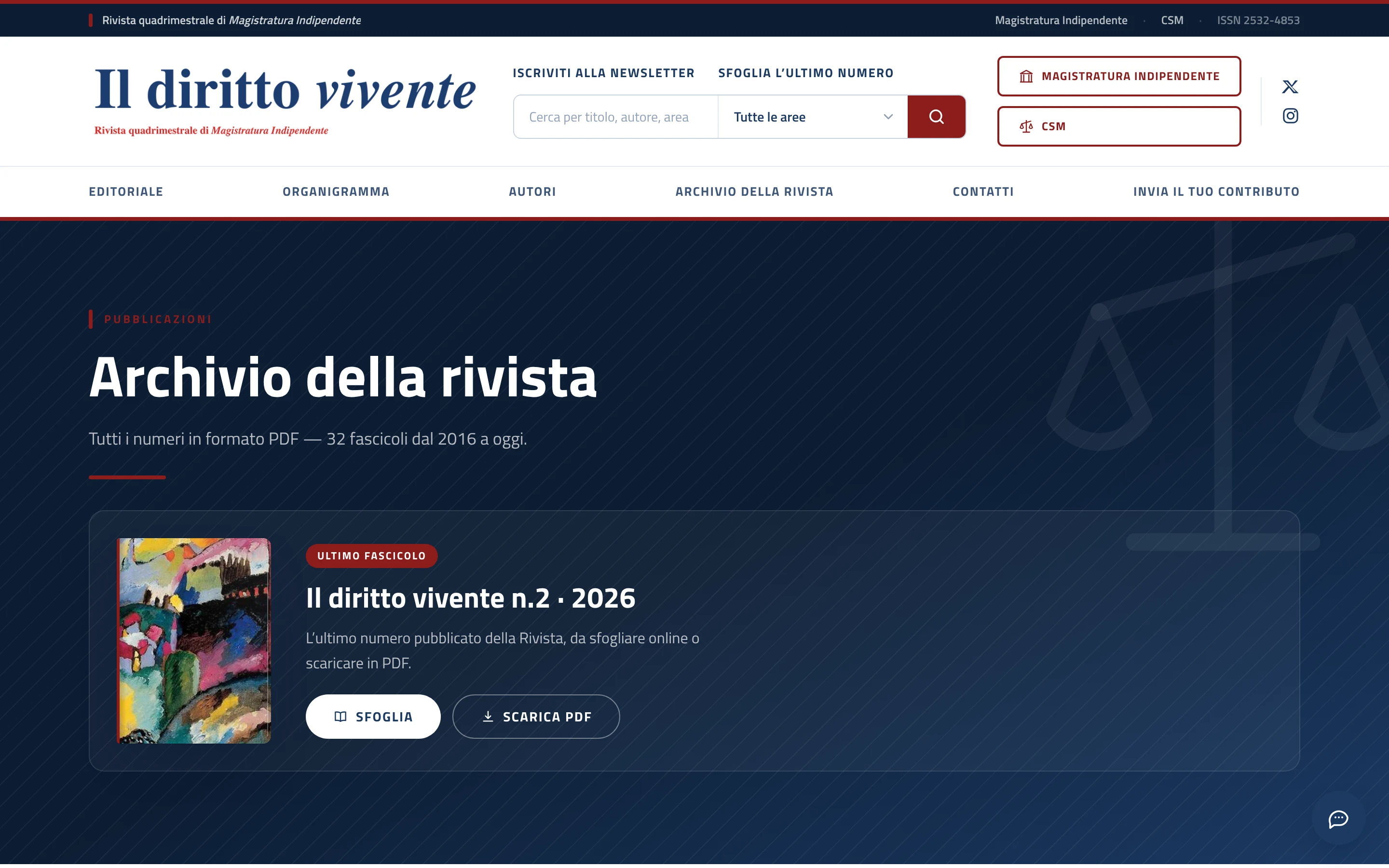
A complete rebuild of the website of Magistratura Indipendente's journal: articles, an archive of issues and a custom CMS, with the whole historical archive moved from the old SQL database to Firebase.
Fact sheet
- Role
- Design, development, data migration and editorial publishing, on my own
- Year
- 2026
- Status
- Public
- Sector
- Legal publishing
- Devices
- Web browser, Smartphone
- Main stack
- Next.js · React · TypeScript · Tailwind CSS · Firestore · Firebase Auth · Nodemailer · jsPDF · Vercel · SEO
Overview
The project at a glance
A complete rebuild of the website of Magistratura Indipendente's journal: articles, an archive of issues and a custom CMS, with the whole historical archive moved from the old SQL database to Firebase.
Il diritto vivente is the legal journal of Magistratura Indipendente, with three issues a year plus special issues. The previous site, by another supplier, ran on obsolete technology and an SQL database that was hard to read and to edit. I rebuilt everything on my own: the new public site, the back office for the editorial team and the migration of the whole historical archive to Firebase. Today I also handle the publishing of the articles and issues of each number.
Features
A site to read, a CMS to publish
From the reader to the editorial team: everything an online journal needs.
Articles by area
Search and filters across seven subject areas: civil, labour, criminal, judicial system, tax, Europe and constitutional/public law.
Comfortable reading
Progress bar, reading time, in-text search with highlighting, sharing and the article as a PDF.
Archive of issues
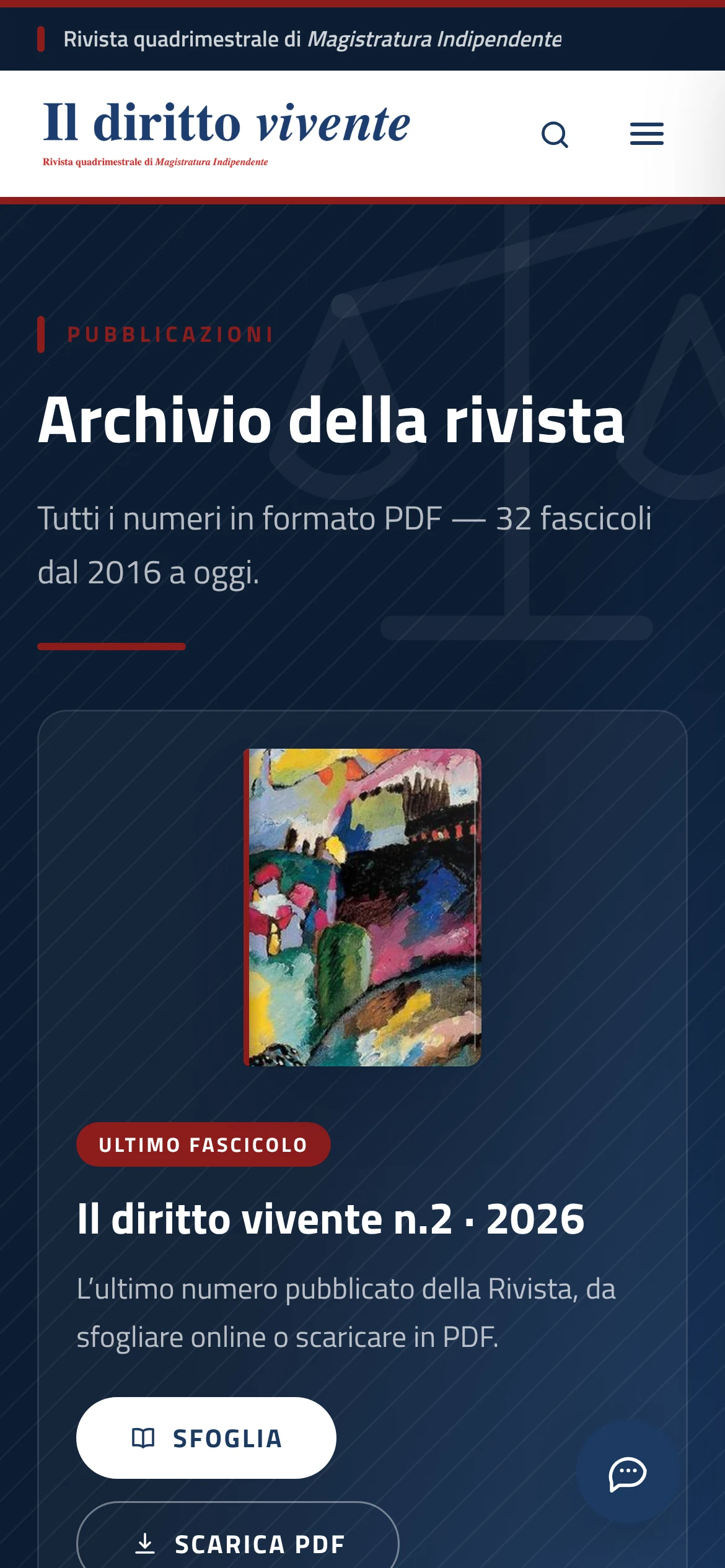
Every issue since 2016, to browse online or download as a PDF, filterable by year, with the latest issue highlighted.
Search across the site
A search window by title, author and area, reachable from every page.
The editorial team
The Director's editorial, the organisation chart and the authors, each with its own page.
Send your contribution
A form to propose a piece of writing, with an attached file up to 2 MB and an email confirmation.
Newsletter and contact
Newsletter sign-up and a contact form, with a confirmation email to the user.
Site guide
An assistant with guided questions that points to articles, the archive, contributions and contacts.
Back office for the editorial team
An editor with live preview, new categories as well, tags and date, and automatic cleaning of HTML pasted from Word.
The challenge
The problem to solve
The existing site rested on obsolete technology and an SQL database whose data was hard to read. It looked unpolished, worked badly on phones and had a cookie banner that did not work. The whole historical archive had to move to a new base without losing anything, and the editorial team needed a simple way to publish.
From an old SQL database archive to a modern site, with a custom-built CMS.
History
From the old site to the new
A complete rebuild, with the editorial team still publishing.
Before
The previous site
By another supplier: obsolete technology, a hard-to-read SQL database, an unpolished look, poor on phones and a cookie banner that did not work.
2026
The rebuild
A new Next.js site, a custom CMS and the migration of the whole historical archive to Firebase.
Every issue
Publishing
Three issues a year, plus special issues: I publish the articles from the CMS, prepare the issue and upload the PDF to the archive.
Approach
From problem to release
Analysis
The articles came from an SQL database, with damaged characters, categories and author names in mixed formats, and from messy HTML pasted from Word. First I worked out what needed cleaning, then where to do it: in the migration, in the CMS at publishing time and on the site while reading.
Design
Midnight blue and burgundy red, an italic masthead and Titillium Web for the text. A header with search and a link to the latest issue, pages with a dark title band and a reading experience designed for long texts.
Development
Next.js, React and TypeScript with Tailwind; Firestore for the articles; Firebase Authentication for the back office; Nodemailer for the forms; jsPDF to download an article as a PDF.
Release
Deployed on Vercel. Article pages refresh themselves every minute, so something published from the CMS appears on the site without a new deploy.
Architecture
How it is built
A Next.js application. Articles live on Firestore and the article pages are generated on the server with periodic refresh; the text is cleaned against an allowed-tag list before it is shown. The back office, behind a Firebase login, writes articles directly and cleans them on paste. The forms go through server routes that revalidate every field and send emails with Nodemailer. The PDF issues are static files of the site.
Illustrative diagram
Parts of the diagram
Hover over a part, or select it, to read what it does.
Quality
Content, forms and privacy
The site publishes other people's texts and receives files and personal data: here is what is in the code.
Content
- The text of the articles goes through a list of allowed tags and styles before it is shown.
- The CMS cleans HTML from Word and warns if the title or author is repeated in the body.
- Characters and author names damaged by the old migration are fixed when reading.
- Structured data, Open Graph metadata and a canonical URL on every article.
Forms
- A trap field and a minimum filling time against bots.
- Every field is revalidated by the server, not only by the browser.
- Contributions accept only PDF, Word, ODT, TXT and RTF up to 2 MB, with a check of the real content of the file.
- The confirmation to the user never blocks the message to the secretariat.
Privacy and access
- Cookies in four categories, with the consent saved and reopenable from the footer.
- Security headers: nosniff, referrer policy, X-Frame-Options and Permissions-Policy.
- The back office requires a Firebase Authentication login.
Results
What changed
All migrated
Archive
The articles of the old database are in the new one, with characters, categories and authors cleaned up. The PDF issues are all in the archive, from 2016.
From Word to CMS
Publishing
HTML pasted from Word is cleaned up automatically, and the CMS flags a title or author repeated in the text.
Search and PDF
Reading
Search across the site and within an article, reading time and the article as a PDF in one click.
Data available on request
Contribution
From the old database to the issues
A commission for Magistratura Indipendente: I did everything myself.
Visuals and interface
The identity of the site, the masthead, the pages and the reading of the articles.
Data migration
Moving the historical archive from the SQL database to Firebase, with the data cleaned.
Custom CMS
Editor, preview, categories, restricted access and HTML normalisation.
Site, forms and email
Search, archive, contributions, newsletter, contact, PDF and cookies.
Issues
Layout, PDF and cover of every issue, uploaded to the archive.
Publishing and going live
The articles of each issue from the CMS and the deploy on Vercel.
Stack
Technologies
- Frontend
- Next.js
- React
- TypeScript
- Tailwind CSS
- jsPDF
- Backend
- Firebase Auth
- Nodemailer
- Data
- Firestore
- Infrastructure
- Vercel
- Fields
- SEO
Gallery
Screens
More projects
Keep exploring
Related projects



Interested in a similar project?
Write to me: I can present the work in detail, within the limits of the confidentiality agreements.